 Cypress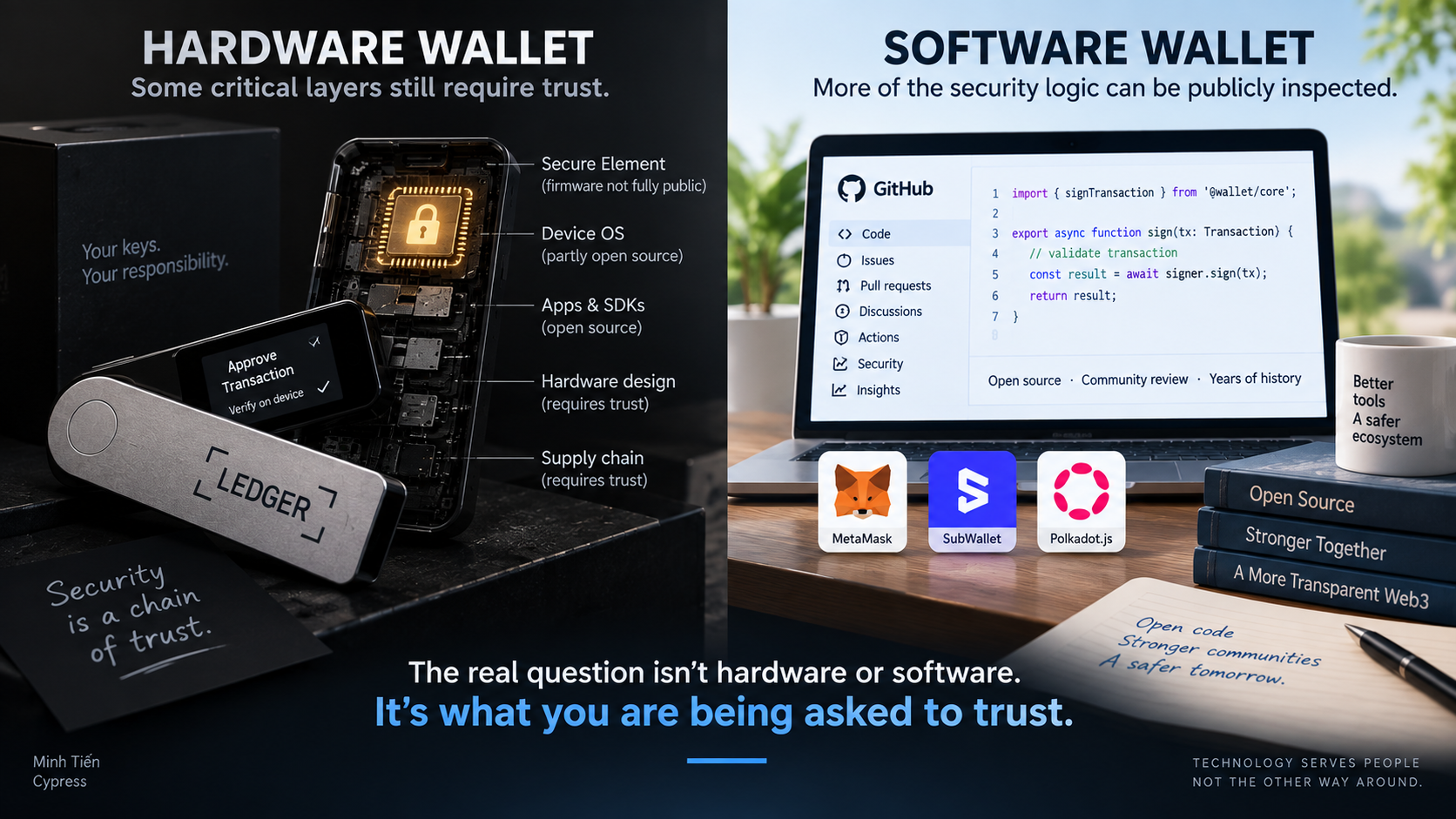
Let me state my position clearly:
If someone advertises the device they are selling as a “cold wallet,” I consider that misleading advertising.
They can sell you a hardware wallet.
But nobody can sell you the state of being “cold.”
Hot or cold is not an inherent property of a device. It is determined by how you generate, store, and use your keys.
A Regular Smartphone Can Become Cold Storage
I can take an ordinary smartphone, install Nova Wallet, create a wallet, back up the seed securely, disconnect the phone from the internet, and put it away.
No SIM.
No Wi-Fi.
No web browsing.
No additional apps.
No dApp connections.
No routine transaction signing.
Nobody sold me that phone as a “cold wallet.”
Nova is simply a software wallet.
Yet the way I operate the device has turned it into a form of cold storage.
Now consider the opposite.
I can buy a hardware wallet and connect it to my computer every day, use DeFi, swap tokens, approve spending permissions, interact with smart contracts, and sign transactions constantly.
Which one is colder?
The answer is not written on the hardware wallet’s box.
It lies in how the key is used.
A Hardware Wallet Solves One Problem — Not Every Problem
The real advantage of a hardware wallet is clear:
It attempts to isolate your private key from the internet-connected computer or phone you are using.
If malware is trying to extract your private key from your computer, that isolation can be extremely valuable.
But losing crypto does not always require someone to steal your private key.
There is often a much easier attack:
Convince you to sign.
A malicious website presents a transaction.
With a software wallet:
Review → Confirm → Sign.
With a hardware wallet:
Review → Confirm on the computer → Confirm on the device → Sign.
If you approve the malicious transaction yourself, both processes ultimately produce the same thing:
a valid cryptographic signature.
The blockchain does not know whether you used a Ledger, a smartphone, or a browser extension.
It does not know that you were deceived.
It only knows:
The correct key signed.
That distinction matters.
Protecting the private key is not the same thing as protecting the assets from every possible threat.
A Hardware Wallet Is Software Too
A hardware wallet is not a magical piece of metal.
Inside it are chips, firmware, a bootloader, applications, update mechanisms, and code written by human beings.
There is also a manufacturer.
There is a production process.
There is a supply chain.
And there are trust assumptions.
This does not mean hardware wallets are unsafe. Their key-isolation architecture provides a genuine security advantage against certain attacks.
Nor is it accurate to say that hardware wallets are completely closed source. Ledger, for example, publishes significant parts of its software ecosystem, while some critical lower-level components associated with its Secure Element are not fully public.
The important point is more subtle:
“Hardware” does not automatically mean “safe.”
And:
“Software” does not automatically mean “unsafe.”
They have different security architectures and different trust assumptions.
Now Look at Software Wallets
Nova publishes the source code for its mobile applications.
SubWallet publishes the source code for its extension and mobile wallet.
Polkadot.js Extension is open source.
The core MetaMask Extension source is also publicly available and has years of public development history.
None of this proves that these wallets cannot contain vulnerabilities.
Open source does not mean perfectly secure.
But openness provides an important security property:
verifiability.
Code can be inspected.
Changes can be tracked.
Development history can be examined.
Issues can be discovered publicly.
Independent developers and security researchers can challenge assumptions.
A piece of software that has existed publicly for years, with its source code exposed to continuous scrutiny, has a very different trust model from the simplistic assumption:
Software = hot = dangerous.
Hardware = cold = safe.
Security does not work like that.
Security Is Layered
A software wallet running inside a browser is not simply a private key lying naked on the internet.
There are multiple layers:
Physical device → Operating system → Browser security and sandboxing → Extension environment → Wallet storage/encryption → Signing logic → User confirmation.
An attacker trying to extract a key directly may have to compromise or bypass several layers of protection.
Modern operating systems and browsers themselves are products of decades of security engineering.
Of course, attackers look for shortcuts.
They may compromise the operating system.
They may trick you into installing a fake extension.
They may steal your seed through phishing.
They may replace an address.
They may imitate a legitimate dApp.
Or, easiest of all:
they may persuade you to sign the wrong transaction yourself.
That is why security should be understood as defense in depth, rather than a competition between “hardware” and “software.”
A hardware wallet adds another valuable layer.
It does not make all the other layers irrelevant.
And it certainly does not replace the need to understand what you are signing.
Friction Can Be a Security Feature
There is something in security that UX designers often treat as a problem:
friction.
I think that, in some situations:
friction itself creates security.
Imagine driving a long distance and beginning to fall asleep.
Every so often, something gives you a sharp wake-up call:
Wake up.
Look at the road.
What are you doing?
A good signing process should sometimes work the same way.
Which network are you using?
Which token?
How much are you sending?
What is the recipient address?
What is the fee?
What will this transaction actually do?
Are you sure you want to sign it?
Every checkpoint is another wake-up call.
Annoying?
Yes.
But that annoyance can prevent us from sleepwalking through the Confirm button.
Sometimes UX Can Become Too Smooth
In TestSwap, which we are currently experimenting with, some operations require more steps than users might ideally want.
Traditional UX thinking says this is bad.
Fewer clicks are better.
For financial transactions, I am not convinced that principle should always win.
If six steps merely repeat the same information, remove them.
But if those six steps force the user to see:
Network → Token → Recipient → Amount → Review → Sign
then they are not merely six UX steps.
They may also be six security checkpoints.
An interface that becomes too frictionless can train users into a dangerous behavioral loop:
Confirm → Confirm → Confirm.
Then one day a malicious transaction appears.
The finger does exactly what thousands of previous interactions have trained it to do.
Confirm.
“Cold” Is a Behavior
MetaMask can be hot.
Nova can be hot.
SubWallet can be hot.
And a Ledger can also be operationally hot if you connect it to dApps every day and continuously sign smart-contract interactions.
Meanwhile, an ordinary smartphone can be dedicated to a single key, kept offline, and brought out only under carefully controlled circumstances.
So instead of asking:
“Do you use a hot wallet or a cold wallet?”
Ask:
Where was the key generated?
Where has the seed ever been exposed?
What devices have access to it?
Does the signing device normally connect to the internet?
Which dApps do you interact with?
How frequently do you sign?
What information do you verify before signing?
If you make a mistake, does the process force you to stop and look again?
Those questions tell me far more about the security of your assets than the words “cold wallet.”
Don’t Buy Security in a Box
You can buy a hardware wallet.
It can be an excellent security tool.
But nobody can sell you the state of being cold.
The moment you receive that device, how you operate it begins to determine its actual security model.
That is why I object to simply marketing hardware wallets as “cold wallets.”
It encourages a dangerously simple conclusion:
I bought a cold wallet. Therefore my crypto is safe.
No.
You bought another security tool.
How safe you actually are still depends on how you generate your keys, protect your seed, secure your devices, choose your dApps, inspect transactions, and—most importantly—how you behave before signing.
A good security process may deliberately make you uncomfortable.
It keeps waking you up:
Read again.
Check again.
Understand first. Then sign.
That is security.
No device is inherently a “cold wallet.”
Your operational practices determine whether your keys remain cold or become hot.
And if someone sells you a box while implying that the box itself guarantees “coldness,” they are selling you more than the box can actually guarantee.
Security is not a product. It is a practice.